IN THE BOX
- 1�- Magewell USB Fusion
- USB 3.0 cable
- Power supply
- Quick start guide
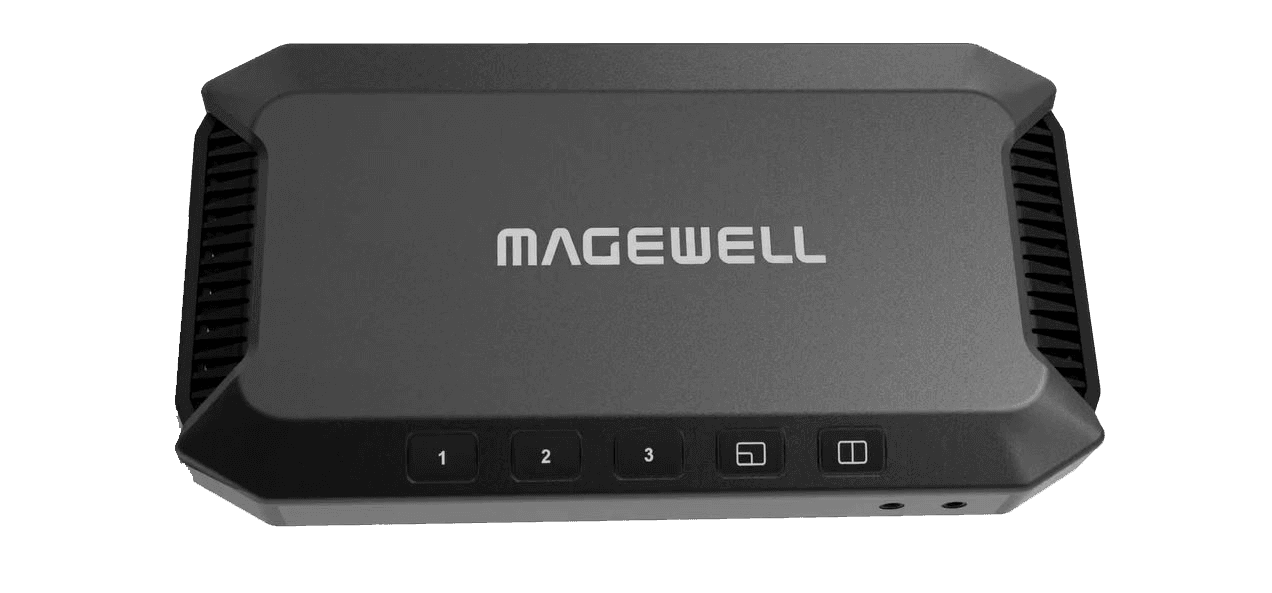
Magewell USB Fusion: Hardware Multi-Source Capture and Composition for Zoom, Teams and OBS
The USB Fusion captures video from multiple sources simultaneously, mixes them into a composed image using its own internal hardware, and presents the result to your computer as a single USB webcam. Your video call platform, streaming application, or recording tool sees one clean camera feed. The mixing and composition happen inside the USB Fusion itself, not on your PC's CPU or GPU.
At £925, it is a serious piece of hardware for presenters, educators, and corporate video teams who need genuinely professional multi-source output without building and maintaining a software-based production stack on their computer.
What It Captures
The USB Fusion accepts three input types simultaneously:
- HDMI input from a camera, PTZ unit, presentation switcher, or any HDMI source
- USB webcam input from any UVC-compatible webcam
- Display capture from your computer's screen, a selected window, or a specific display output
All three can be active at the same time. The USB Fusion scales and composites them into a single output frame using layouts you configure: picture-in-picture, side-by-side, full-screen single source, or custom arrangements. That composed frame is what your computer receives over USB and presents to applications as a webcam.
Why Hardware Composition Matters
Software mixers such as OBS Studio or vMix can achieve similar multi-source results, but they require a capable PC, consume significant CPU and GPU resources, and introduce dependency on software stability and updates. A software-based virtual camera can conflict with other applications, break after a platform update, or degrade under CPU load during a video call.
The USB Fusion offloads all composition processing to dedicated hardware. Your computer only receives the finished, composed USB stream and does not perform any mixing or scaling work. This leaves processor resources free for the video call, presentation software, and other applications. It also means there is no virtual camera driver involved: the USB Fusion is a real hardware UVC device that every platform accepts natively, including Zoom, Teams, Google Meet, and Webex, without plugins or workarounds.
Who This Device Is For
- Presenters and executives who need to appear on camera alongside slides or a secondary source in every video call, without managing software settings or maintaining a production workstation
- Online educators and trainers who want camera plus screen content composed into a single polished frame for recorded or live sessions
- Corporate video and communications teams producing regular webinars or internal broadcasts who need consistent, professional output without a dedicated production operator at each session
- Live streamers and content creators who want hardware reliability for multi-source production without building or maintaining a full PC-based production environment
- Conference room AV systems where a single professional composed feed needs to deliver multiple input sources consistently to video conferencing platforms
Control and Configuration
Layout switching is controlled via the USB Fusion app or directly via the USB connection, allowing real-time transitions between configured scenes without touching host computer settings. The device stores its configuration onboard, so it is ready with the same setup each time it is powered on, regardless of which computer it is connected to.
Buying from StreamKit
- Authorised UK Magewell reseller
- 3-year manufacturer warranty included
- Free delivery to UK addresses
- UK-based technical support
KEY FEATURES
- Two HDMI inputs plus one USB webcam input, combined in hardware
- Multiple layout modes: single-source, side-by-side, PiP, quad
- HDMI output for local monitoring of the composite
- Hardware compositing, no CPU overhead on your PC
- Appears as a single USB 3.0 capture device on Windows/macOS/Linux
- Magewell USB Fusion Utility for layout management
- Genuine UK stock from StreamKit
IDEAL FOR
Online education
Combine a camera, slides, and document camera into one polished composite for Zoom, Teams, or Webex lectures.
Corporate virtual events
Professional multi-source presentations for virtual town halls, webinars, and hybrid meetings.
Live streaming productions
Switch between sources and layouts live during a production, with the composite delivered to OBS or vMix over USB.
Video production
Two camera angles and a laptop output composited in hardware, a lightweight solution for small-scale live productions.